Abstract
A walkthrough of the LetsDefend Learn Sigma lab. The goal isn’t to run a tool, but to
read a real Sigma rule — proc_creation_win_bitsadmin_download.yml — and understand how its
sections (logsource, selection, condition, fields, tags) work together to detect an
attacker abusing the legitimate Windows utility bitsadmin.exe to download malicious payloads.
Understanding how a detection rule is built is what lets a SOC analyst know why an alert
fired, judge false positives, and eventually write rules of their own.
Scenario
A ransomware infection has been detected on a critical system. The malware encrypts sensitive documents and configuration files. The investigation suggests the attacker used the Windows BITS utility
bitsadmin.exeto download additional payloads and to reach its command-and-control (C2) server.
The task is to review the provided Sigma rule and answer questions about how it detects this behaviour.
Rule file: C:\Users\LetsDefend\Desktop\ChallengeFile\proc_creation_win_bitsadmin_download.yml
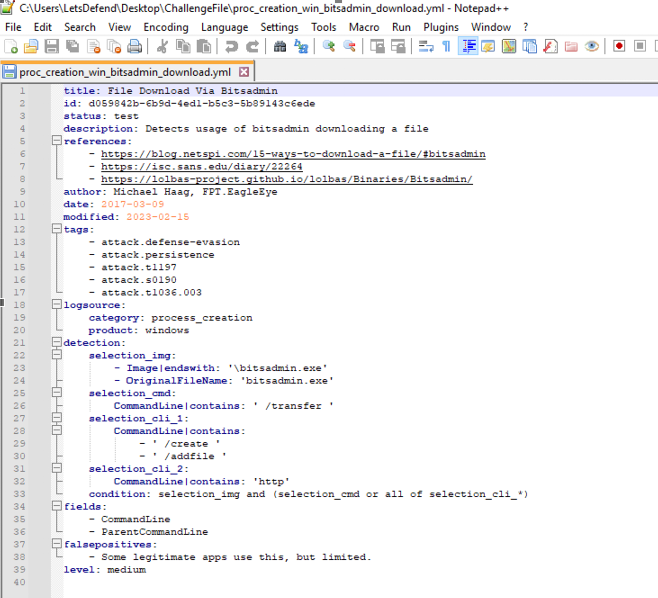
Q1. Which executable file does this rule target?
Opening the file, the selection_img block matches on the image name. The rule targets
bitsadmin.exe.
Q2. Which command-line option indicates a file transfer?
Among the command-line selections, three options appear, but only one corresponds to an actual
transfer: the /transfer option.
Q3. Which logical expression in the condition field combines the criteria?
The condition line ties the image match and the command-line match together:
condition: selection_img and (selection_cmd or all of selection_cli_*)
the process must be bitsadmin.exe and either /transfer is present or all of the selection_cli_* groups match.
Q4. Which field does the rule capture to show the command being executed?
Just above the condition, the captured field is CommandLine — that’s what shows the analyst
the exact command the attacker ran.
Q5. Which single ATT&CK tactic tag is listed first?
In the tags section, the first tactic listed is attack.defense_evasion (Defense Evasion).
Bitsadmin/BITS abuse maps to T1197 — BITS Jobs, used
for both defense evasion and persistence, which is why both tactics appear in the tags.
Q6. What is the primary category of events this rule monitors?
The logsource block defines this. The category is process_creation on Windows — the rule
inspects newly created processes.
Q7. Which command-line argument identifies HTTP-based downloads?
selection_cli_2 targets the command line used for the download. To catch HTTP/HTTPS
downloads it looks for http in the command line.
Q8. Which command-line option must be present to create a new transfer?
Back to Q2 — among the options not yet used, the one that creates a new BITS transfer is
/create.